Quick start
$ tess vault init  # create an encrypted vault
$ tess add "otpauth://totp/ACME:me@x.com?secret=JBSWY3DPEHPK3PXP&issuer=ACME"
$ tess add code.png  # from a QR image
$ tess add --screen  # select a QR code on screen (macOS)
$ tess import --migration "otpauth-migration://offline?data=..."  # Google Authenticator export
$ tess import aegis-export.json  # another app's export, recognized by content
$ cat export.json | tess import -  # read the input from stdin, as tess add - does too
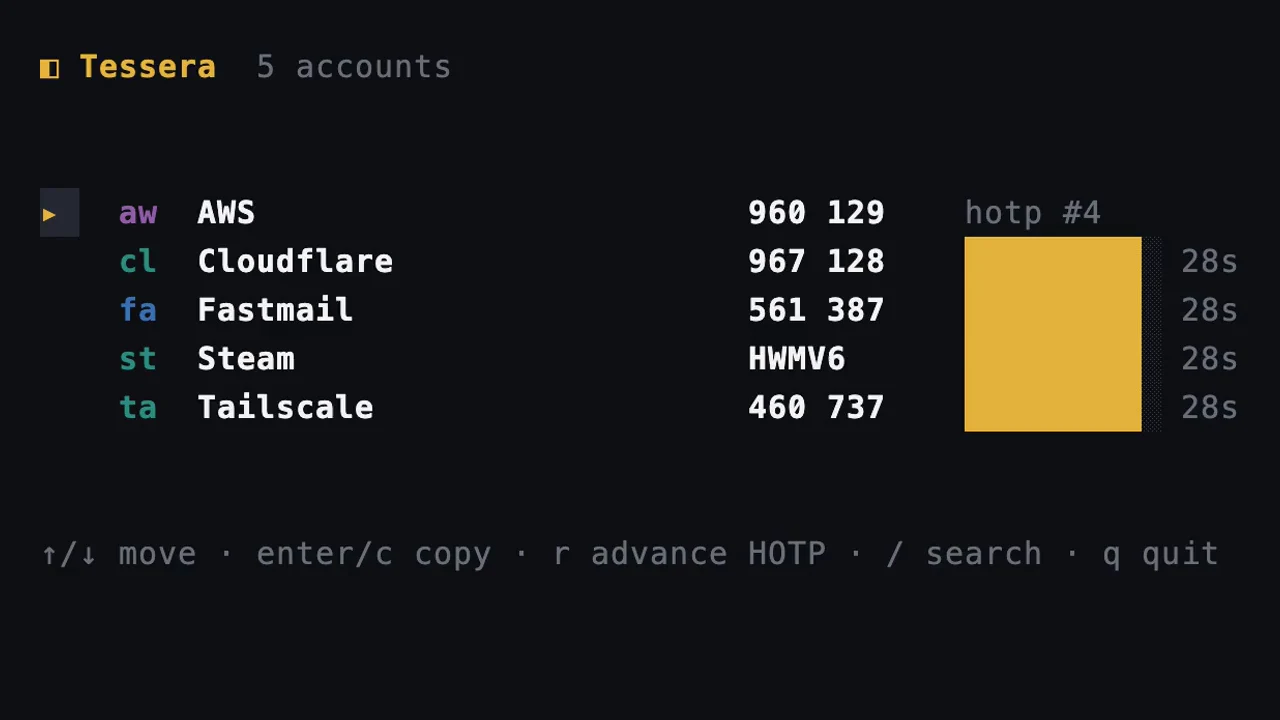
$ tess  # current codes with countdown bars
$ tess watch  # live view: / search, enter or c copy, q quit
$ tess acme  # one account's code, copied to the clipboard
$ tess ac --no-copy  # by handle, as shown by tess list, printed only
$ tess code acme --clear 30  # copy, then clear the clipboard after 30s
$ tess alias ac work  # set a handle
$ tess code --json  # machine-readable
$ tess vault remember  # store the passphrase in the login keychain
$ tess vault status  # path, file details, wrap methods, keychain state
$ tess export --file backup.json  # encrypted copy of the vault
$ tess export --format aegis --out aegis.json  # the vault in another app's export format
$ tess merge --two-way ~/other.json  # reconcile two vaults, writing both
tess import reads unencrypted exports from Aegis, 2FAS, Raivo, andOTP, FreeOTP+, Stratum, Bitwarden and Bitwarden Authenticator, Proton Authenticator, Ente Auth, Apple Passwords and 1Password, plus Google Authenticator transfer QR codes. tess export --format writes Aegis, 2FAS, Bitwarden Authenticator, Proton Authenticator, andOTP, Apple Passwords CSV and Google Authenticator QR codes back out.
Accounts resolve by exact handle, then exact issuer or account name, then a unique substring. When more than one account matches, tess lists them with their handles instead of guessing.
tess acme is short for tess code acme; a subcommand name always wins over an account handle. On a terminal the code is copied as well as printed; piped or with --json tess prints the digits and leaves the clipboard alone, unless you pass -c. --no-copy turns the copy off, and --clear wipes it after a delay, only while the clipboard still holds that code. A code with under four seconds left is held back until the next one unless you pass --now.
Reference
Global flag: --vault sets the vault file for any command. With no argument, tess prints current codes for every account; with one, it prints and copies that account's code.
Print and copy TOTP/HOTP/Steam codes from an encrypted local vault.

  tess                     current codes for every account
  tess acme                one account's code, copied to the clipboard
  tess watch               live view with countdown bars
  tess add <uri|key|file>  add accounts
  tess vault init          create a vault

Usage:
  tess [query] [flags]
  tess [command]

Codes:
  code         Print the current code for a matching account (or all if omitted)
  watch        Live, auto-refreshing view with countdown bars and copy

Accounts:
  add          Add accounts from an otpauth/migration URI, a setup key, a QR image, an export file, the screen, or manual flags
  alias        Set an account's handle (the short name you type to reference it)
  list         List accounts (without codes)
  move         Move an account into a folder (empty folder to clear)
  rename       Rename an account's issuer, account label, and/or handle
  rm           Remove an account
  show         Show an account's details (type, algorithm, digits, period, folder, tags)
  tag          Add or remove a tag on an account

Transfer:
  export       Export accounts as otpauth URIs, base32 secrets, QR images, another app's export, or an encrypted vault copy
  import       Bulk-import accounts from files, other apps, Google exports, otpauth URIs, or QR images
  merge        Merge accounts from another Tessera vault or encrypted backup into this vault

Vault:
  vault        Manage the vault

Additional Commands:
  completion   Generate the autocompletion script for the specified shell
  help         Help about any command

Flags:
      --clear int      clear the clipboard after this many seconds, 0 to keep (default $TESSERA_CLIP_CLEAR)
  -c, --copy           copy the code to the clipboard (the default on a terminal; -c copies even when piped)
  -h, --help           help for tess
      --json           output JSON (never copies)
      --next           for HOTP, advance and persist the counter
      --no-copy        print the code without touching the clipboard
      --now            print the current code instead of waiting for the next one
      --vault string   vault file path (default $TESSERA_VAULT or ~/.local/share/tessera/vault.json)
  -v, --version        version for tess

Use "tess [command] --help" for more information about a command.
tess code
Print one account's code and copy it to the clipboard:

  tess code acme            # print and copy
  tess code acme --no-copy  # print only
  tess code acme --json     # machine-readable, never copies
  tess code                 # every account's code

The code is copied on a terminal. Piped or with --json, tess prints the raw
digits and leaves the clipboard alone unless you pass -c.

Usage:
  tess code [query] [flags]

Flags:
      --clear int   clear the clipboard after this many seconds, 0 to keep (default $TESSERA_CLIP_CLEAR)
  -c, --copy        copy the code to the clipboard (the default on a terminal; -c copies even when piped)
  -h, --help        help for code
      --json        output JSON (never copies)
      --next        for HOTP, advance and persist the counter
      --no-copy     print the code without touching the clipboard
      --now         print the current code instead of waiting for the next one

Global Flags:
      --vault string   vault file path (default $TESSERA_VAULT or ~/.local/share/tessera/vault.json)
tess watch
Live, auto-refreshing view with countdown bars and copy

Usage:
  tess watch [flags]

Flags:
  -h, --help   help for watch

Global Flags:
      --vault string   vault file path (default $TESSERA_VAULT or ~/.local/share/tessera/vault.json)
tess add
Add one or more accounts. The positional argument auto-detects:

  tess add "otpauth://totp/GitHub:me?secret=..."   # otpauth URI
  tess add ZB573K4APD63E6RLD3WAHI3QFZ35RLEP        # bare base32 setup key -> TOTP
  tess add code.png                                # QR image (all codes decoded)
  tess add export.json                             # Aegis/2FAS/Raivo export, or migration/otpauth lines
  tess add --screen                                # select a QR code on screen (macOS)
  cat export.json | tess add -                     # read the input from stdin

For a setup key, --issuer/--account/--digits/--period/--algorithm override the
TOTP defaults. --qr and --secret keep working as before.

Usage:
  tess add [input] [flags]

Flags:
      --account string     account name (manual/setup key)
      --algorithm string   SHA1|SHA256|SHA512 (manual/setup key) (default "SHA1")
      --digits int         code digits (manual/setup key) (default 6)
      --folder string      folder to place the account(s) in
  -h, --help               help for add
      --issuer string      issuer (manual/setup key)
      --period int         period seconds (manual/setup key) (default 30)
      --qr string          decode the account(s) from a QR image file (png/jpeg/webp/tiff/bmp)
      --screen             select a QR code on screen and add it (macOS)
      --secret string      base32 secret (manual)
      --type string        totp|hotp|steam (manual) (default "totp")

Global Flags:
      --vault string   vault file path (default $TESSERA_VAULT or ~/.local/share/tessera/vault.json)
tess alias
Set an account's handle (the short name you type to reference it)

Usage:
  tess alias <account> <handle> [flags]

Flags:
  -h, --help   help for alias

Global Flags:
      --vault string   vault file path (default $TESSERA_VAULT or ~/.local/share/tessera/vault.json)
tess list
List accounts (without codes)

Usage:
  tess list [flags]

Aliases:
  list, ls

Flags:
      --folder string   filter by folder
  -h, --help            help for list
      --json            output JSON
      --tag string      filter by tag

Global Flags:
      --vault string   vault file path (default $TESSERA_VAULT or ~/.local/share/tessera/vault.json)
tess move
Move an account into a folder (empty folder to clear)

Usage:
  tess move <query> <folder> [flags]

Flags:
  -h, --help   help for move

Global Flags:
      --vault string   vault file path (default $TESSERA_VAULT or ~/.local/share/tessera/vault.json)
tess rename
Rename an account's issuer, account label, and/or handle

Usage:
  tess rename <query> [flags]

Flags:
      --account string   new account label
      --handle string    new handle (short identifier)
  -h, --help             help for rename
      --issuer string    new issuer

Global Flags:
      --vault string   vault file path (default $TESSERA_VAULT or ~/.local/share/tessera/vault.json)
tess rm
Remove an account

Usage:
  tess rm <query> [flags]

Flags:
  -h, --help   help for rm

Global Flags:
      --vault string   vault file path (default $TESSERA_VAULT or ~/.local/share/tessera/vault.json)
tess show
Print one account's record. The secret is never shown unless you ask for it:

  tess show github            # details, no secret
  tess show github --secret   # also print the base32 setup key (cleartext)
  tess show github --uri      # also print the otpauth:// setup link (cleartext)

Usage:
  tess show <query> [flags]

Flags:
  -h, --help     help for show
      --secret   also print the base32 setup key (cleartext)
      --uri      also print the otpauth:// setup link (cleartext)

Global Flags:
      --vault string   vault file path (default $TESSERA_VAULT or ~/.local/share/tessera/vault.json)
tess tag
Add or remove a tag on an account

Usage:
  tess tag <query> <tag> [flags]

Flags:
  -h, --help     help for tag
      --remove   remove the tag instead of adding it

Global Flags:
      --vault string   vault file path (default $TESSERA_VAULT or ~/.local/share/tessera/vault.json)
tess export
Export account data (CLEARTEXT secrets — handle with care):

  tess export --uri                 # all accounts as otpauth:// URIs (bulk backup / migrate)
  tess export --uri github          # one account's otpauth URI
  tess export --secret github       # just the base32 secret (the raw key)
  tess export --qr ./qrcodes        # a QR PNG per account (scan into a phone)
  tess export --qr ./qrcodes github # one account's QR PNG
  tess export --file backup.json    # an encrypted copy of the whole vault (safe to store)
  tess export --format aegis        # the vault in another app's export format, on stdout
  tess export --format aegis --out aegis.json          # ... or written to a file
  tess export --format google-migration --out ./qr     # transfer QR codes for Google Authenticator

Formats for --format:
  2fas              2FAS Auth backup JSON (no backup password)
  aegis             Aegis Authenticator vault JSON (unencrypted)
  andotp            andOTP plain backup JSON
  apple-csv         Apple Passwords CSV (Title,URL,...,OTPAuth)
  bitwarden         Bitwarden Authenticator JSON export
  google-migration  Google Authenticator transfer QR codes (PNG per batch)
  proton            Proton Authenticator JSON export (no password; TOTP and Steam only)

Usage:
  tess export [query] [flags]

Flags:
      --file string     write an encrypted copy of the vault to this path
      --format string   rewrite the vault as another app's export: 2fas, aegis, andotp, apple-csv, bitwarden, google-migration, proton
  -h, --help            help for export
      --out string      where --format writes: a file, or a directory for multi-file formats (default stdout)
      --qr string       write a QR PNG per account to this directory (cleartext secrets)
      --secret          print only the base32 secret(s) (cleartext)
      --uri             print otpauth:// URIs (secrets in cleartext)

Global Flags:
      --vault string   vault file path (default $TESSERA_VAULT or ~/.local/share/tessera/vault.json)
tess import
Import accounts in bulk. Sources combine and can be repeated; everything that
parses is imported, and items that fail are listed without aborting the batch:

  tess import accounts.txt export.json code.png   # paths auto-detect by content
  cat export.json | tess import -                 # read the input from stdin
  tess import --file accounts.txt                 # otpauth:// / otpauth-migration:// lines, or a setup key per line
  tess import --file export.json                  # an app export (see the list below)
  tess import --qr a.png --qr b.png               # QR images (multiple codes per image are all read)
  tess import --migration "otpauth-migration://offline?data=..."
  tess import --otpauth "otpauth://totp/...."

Exports it reads, recognized by content rather than by file name:

  Aegis, 2FAS, Raivo, andOTP, FreeOTP+, Stratum (Authenticator Pro),
  Bitwarden Authenticator, Bitwarden, Proton Authenticator, Ente Auth,
  Apple Passwords (CSV), 1Password (CSV and .1pux), and Google Authenticator
  (an otpauth-migration:// URI or a photo of its transfer QR code)

An export must be unencrypted; an encrypted one is refused by name rather than
half-read. Items with no one-time-password field, which is most of a password
manager's export, are left out. Duplicate accounts (same type, issuer, account
and secret) are skipped. docs/TRANSFER.md lists what to export from each app.

Usage:
  tess import [path...] [flags]

Flags:
      --file stringArray        text, JSON, CSV or .1pux export file, - for stdin (repeatable)
  -h, --help                    help for import
      --migration stringArray   Google Authenticator otpauth-migration:// URI (repeatable)
      --otpauth stringArray     single otpauth:// URI (repeatable)
      --qr stringArray          QR image file (repeatable; png/jpeg/webp/tiff/bmp)

Global Flags:
      --vault string   vault file path (default $TESSERA_VAULT or ~/.local/share/tessera/vault.json)
tess merge
Merge another Tessera vault (or an encrypted backup exported from the macOS
app) into the current vault. Accounts are unioned, never dropped:

  - an account present in both (same id) keeps whichever copy was edited last
  - an account already present by content (same type/issuer/account/secret) is skipped
  - every other account is added

By default the source file is opened read-only and only the current vault is
written. --two-way applies the same rule in both directions and WRITES BOTH
FILES, so two vaults that have drifted apart end up holding the same accounts:

  tess merge --two-way ~/Library/.../app-vault.json

Each vault keeps its own handles. If the source shares this vault's passphrase
you are not prompted again; otherwise enter the source's passphrase (or set
$TESSERA_MERGE_PASSPHRASE).

Usage:
  tess merge <vault-file> [flags]

Flags:
  -h, --help      help for merge
      --two-way   also write the missing and newer accounts back into the source vault

Global Flags:
      --vault string   vault file path (default $TESSERA_VAULT or ~/.local/share/tessera/vault.json)
tess vault
Manage the vault

Usage:
  tess vault [command]

Available Commands:
  forget      Remove the vault passphrase from the login keychain
  init        Create a new empty encrypted vault
  passwd      Change the vault passphrase
  remember    Store the vault passphrase in the login keychain
  reset       Delete the vault file so a fresh vault can be created
  status      Show the vault path, file details, and wrap methods

Flags:
  -h, --help   help for vault

Global Flags:
      --vault string   vault file path (default $TESSERA_VAULT or ~/.local/share/tessera/vault.json)

Use "tess vault [command] --help" for more information about a command.